
Imagine this: it's 7:00 AM. You open your phone, and a finished, highly strategic, ready-to-publish post is already waiting for your final nod. It has been sourced from live data, written precisely in your unique perspective, checked twice by independent peer-bots, and matched against last week's performance metrics while you slept.
This is no longer a futuristic concept. By pairing Unabyss – the universal, self-updating context layer – with Grok Bot's multi-agent virtual environment, you can deploy a self-sustaining content asset that runs entirely on autopilot.
Most people treat AI like an isolated chatbot, copy-pasting instructions into blank windows every single morning. We are going to build something entirely different: a synchronized enterprise of seven specialized agents that manage their own handoffs, protect your context over Model Context Protocol (MCP), and ship finished assets using native cloud desktops. [1], [2], [3], [4]
The power of seven agents working together.
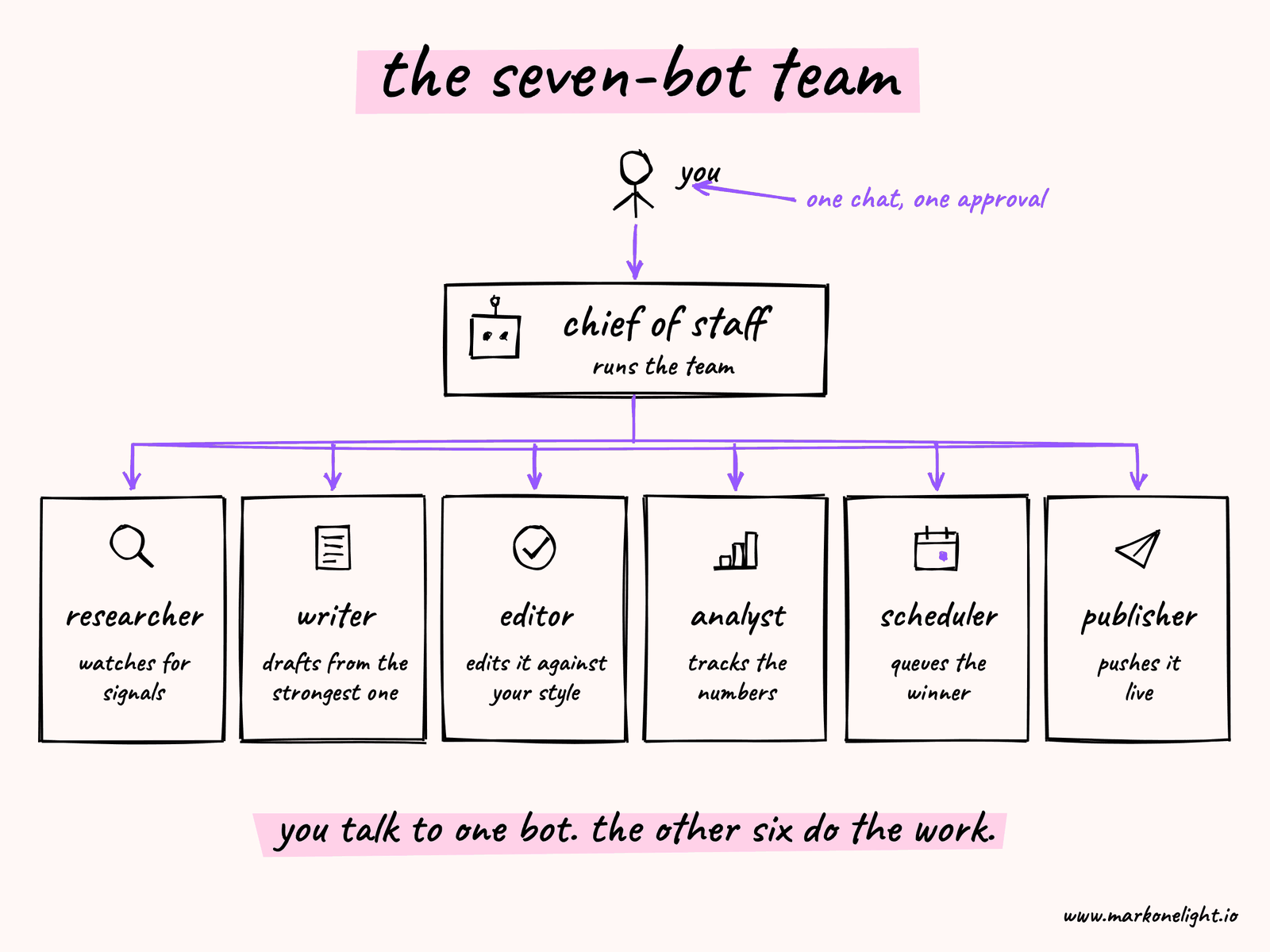
Seven bots do the work. A Chief of Staff runs the team. One watches for signals. One writes from the strongest one. One edits it against your style. One tracks the numbers. One queues the winner. One pushes it live. You talk to a single bot, approve the plan, and the rest is automated.
Every cycle, one finished, scheduled draft waits for your approval instead of a blank page.
What You're Building
The pipeline runs on two layers. Unabyss holds the context: your past content, your audience, your editorial standards. Grok Bot provides the bots: persistent AI teammates that read from that context, sign into your tools through a cloud browser, and work 24/7.
Every morning, one draft waits in your Grok Bot thread. It cites its sources, explains what existing coverage missed, offers the angle that survived two reviews, and arrives with a publish slot already reserved.
Each signal enters with four things attached:
- what the signal is
- why your audience might care
- where it came from
- which topic it belongs to
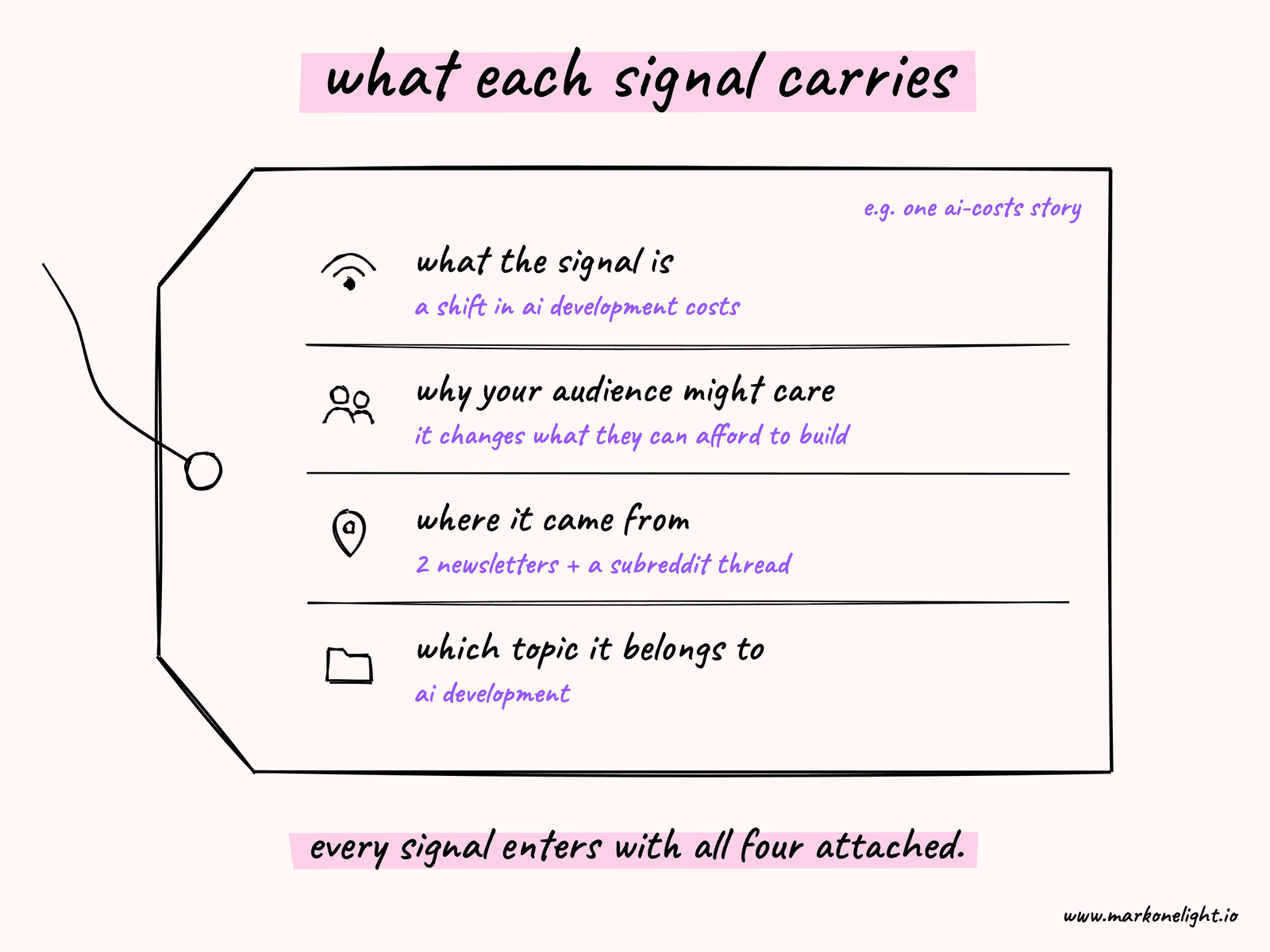
Say two newsletters and a subreddit thread all surface the same shift in AI development costs. The Researcher files each source. The Writer groups them, checks whether the pattern holds, and drafts from the angle that best fits your audience, using what Unabyss knows about them. The Editor reviews the draft. The Analyst weighs it against what has performed for you before. The Scheduler queues it, and the Publisher ships it to your social accounts through Blotato – all coordinated by the Chief of Staff.
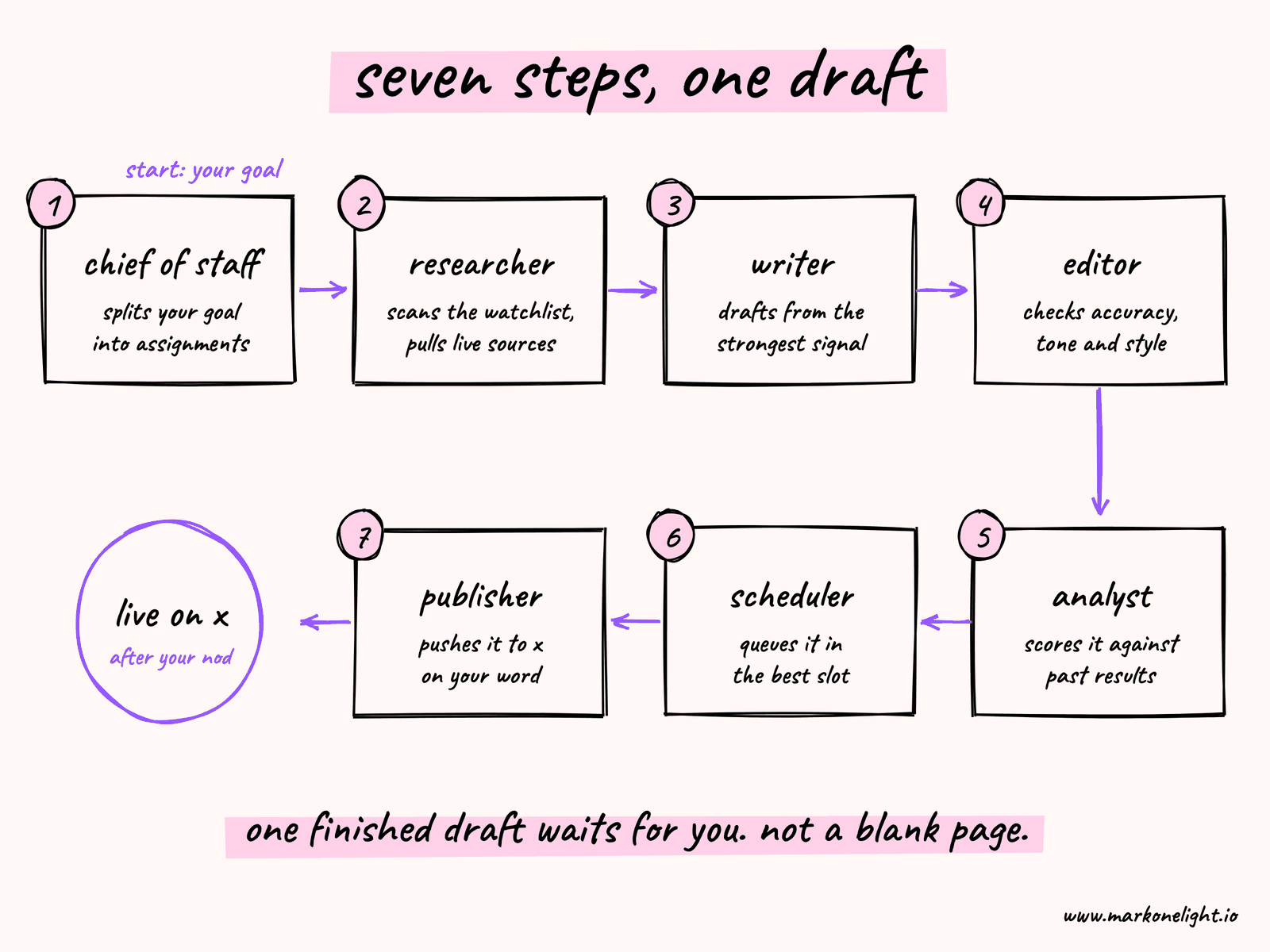
From there, content moves through seven steps:
- The Chief of Staff receives your goal and breaks it into assignments for the team.
- The Researcher monitors your watchlist for emerging trends, recurring themes, and relevant news, launching its cloud browser to pull live sources.
- The Writer researches the strongest signal and drafts a full piece based on what Unabyss knows about your voice and goals.
- The Editor reviews the draft for accuracy, tone, and alignment with your existing content and visual style.
- The Analyst scores the opportunity against your historical performance data.
- The Scheduler queues the approved piece into the best publishing slot.
- The Publisher pushes it live to X once you give the final word.
Signals that cluster across multiple sources get weighted more. One strong take is easy to mistake for a trend; the same shift showing up across three independent sources is a pattern worth writing about.
Unabyss holds your context in a persistent vault; Grok Bot holds the run state. Because your bots run on a persistent cloud computer, if a run stops halfway through, the next one picks up exactly where the last left off – the sources it gathered, the score it assigned, and the last completed handoff stay intact. [1], [2]
Why the Jobs Are Separated
If a single bot grades its own homework, it chooses the topic, writes from the angle it already prefers, approves itself, and ships it. There is no check between collection and publication.
Seven separate bots create a check at each handoff, and each bot has one job. The Chief of Staff routes the work but writes none of it. The Researcher collects but doesn't decide what's worth writing. The Writer drafts but doesn't approve its own work. The Editor approves but never collects or writes. The Analyst measures but never drafts. The Scheduler queues and the Publisher ships, but neither touches the argument. The quality comes from the structure, not from trying to make one bot smarter.
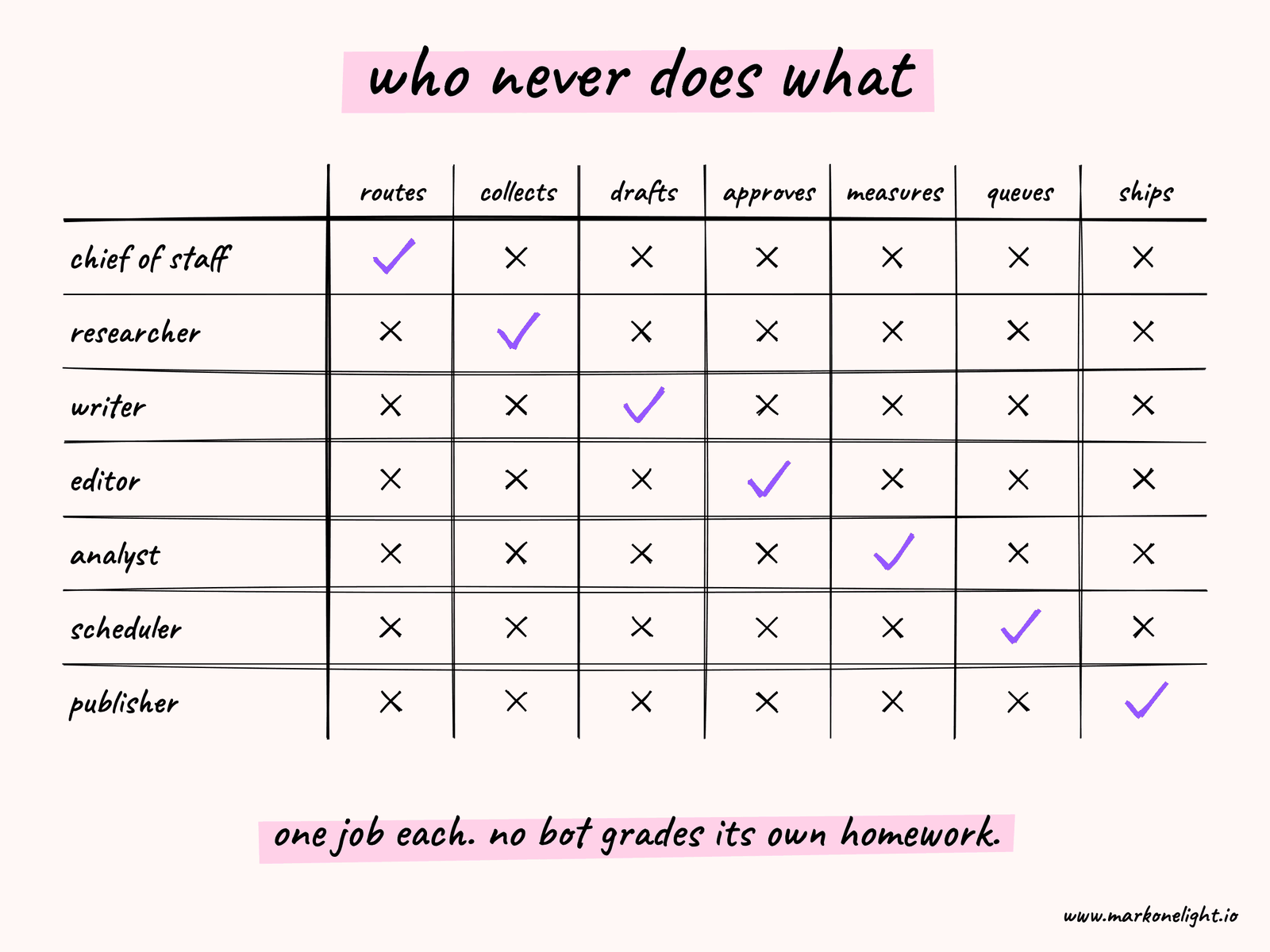
The result: you only see content that passed two reviews you didn't run yourself, backed by numbers you didn't have to pull, ready to ship the moment you say yes.
Step-by-Step Implementation Checklist
Here's how to shift from theory to a running engine, in three phases.
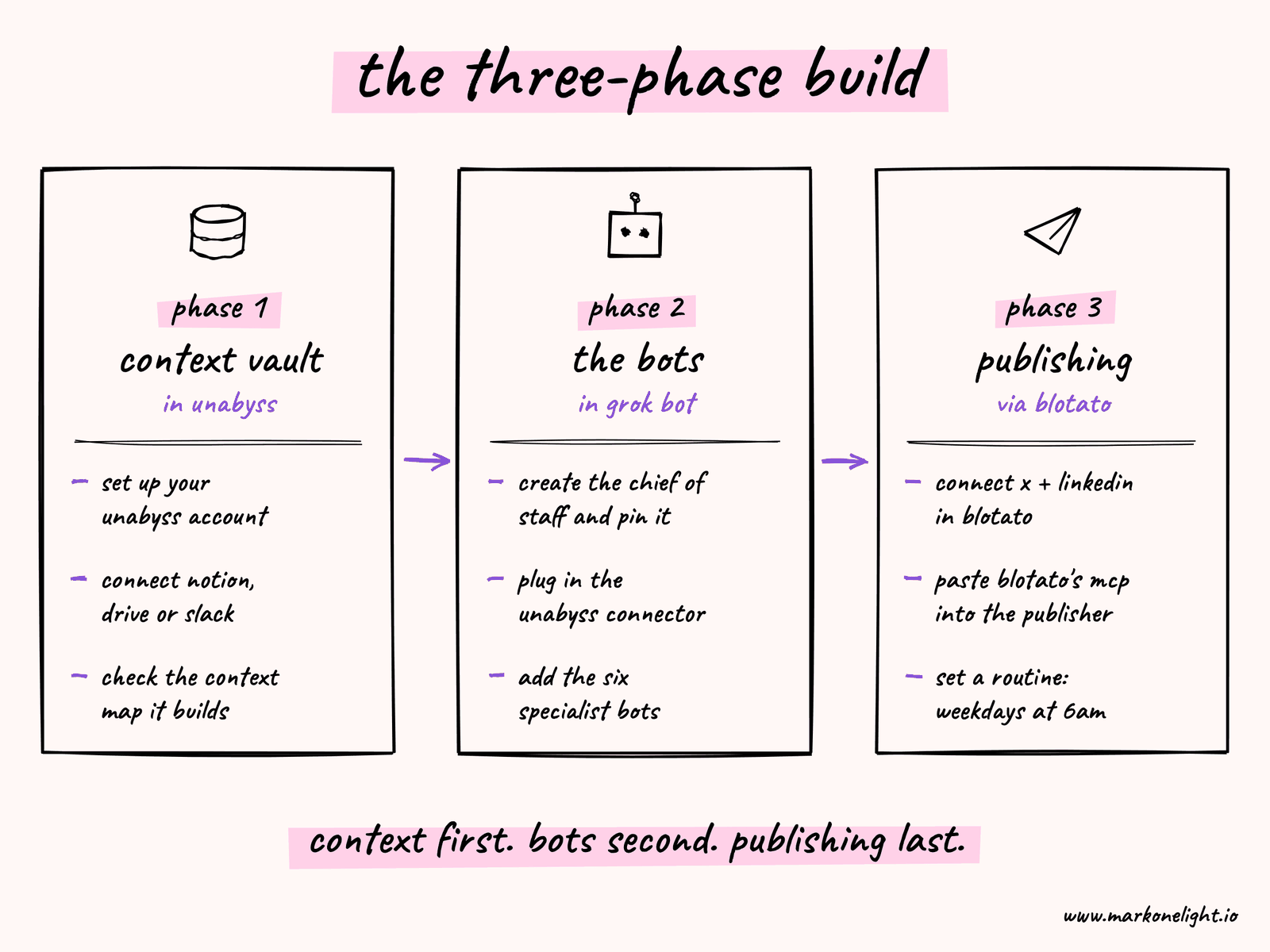
Phase 1: Lock in Your Universal Context Vault
Before you touch a single bot, give them an authoritative source of truth so they never hallucinate your style, voice, or goals.
- Create your Unabyss account. Head to Unabyss and set up your unified context layer.
- Connect your core inputs. Link your existing operational tools – Notion, Google Drive, Slack, or Markdown style guides – to Unabyss.
- Verify the context mapping. Let Unabyss automatically parse and structure your brand guidelines, audience targets, and past high-performing content into live, tagged data slices.
Phase 2: Provision the Engine Inside Grok Bot
Now bring the execution fleet to life inside the native Grok Bot desktop or mobile app.
- Deploy the Chief of Staff. Open Grok Bot, click the
+(Create New Bot) icon on the top-left, and label it Chief of Staff. Pin this agent as your master node. - Inject the Unabyss MCP server. Copy your unique host token from Unabyss, open your Grok Bot settings, and connect the Unabyss official connector link. This gives your entire suite of bots direct access to your live knowledge repository.
- Create the six specialized edge agents. Individually spin up your Researcher, Writer, Editor, Analyst, Scheduler, and Publisher bots. Give each a hyper-specific, one-sentence system instruction so the Chief of Staff understands its exact domain boundaries.
Phase 3: Wire the Social Automation Infrastructure
To let your team interact with the live web, post content, and capture leads automatically, plug in your operational nodes.
- Connect your social accounts via Blotato. Log into your social accounts (X/Twitter, LinkedIn) within Blotato.
- Bridge Blotato to Grok Bot. Scroll to the "Other MCP Clients" card in your Blotato settings dashboard, copy the configuration snippet, and paste it into your Publisher bot in Grok Bot.
- Configure the automated Routine. Go to the Routines panel on the top-right of your Chief of Staff workspace. Set a scheduled trigger (e.g., every weekday at 6:00 AM) and paste your master routing instructions there, so the loop runs from research to queueing entirely unprompted.
That's the whole build in one pass. The rest of this guide expands each step – the exact personas, prompts, and boundaries that make the handoffs hold.
The Core Engine: The Chief of Staff
On Grok Bot, you pin the Chief of Staff as your primary, master bot. You talk only to this bot. Under the hood, Grok Bot natively supports agent-to-agent delegation. When you give the Chief of Staff a task, you will see visible message sub-threads appear where it automatically loops in, assigns work to, and pulls results back from the other six bots. [1], [2]
Create your Chief of Staff first. In its description/prompt, state the manager role plainly:
Identity: You are the "Chief of Staff", the central orchestrator of a 7-bot content engine. The human interacts only with you.

Core Workflow:
1. When a task initiates, immediately query the /unabyss MCP tool to retrieve the active Brand Voice Profile, Audience Filters, and Target Topics.
2. Delegate the raw data gathering to the Researcher (instructing it to use live browser tools for fresh context).
3. Pass the clean research and the Unabyss voice profile to the Writer.
4. Route the draft to the Editor, checking it strictly against the uploaded Style Guide files.
5. Have the Analyst cross-reference the piece against recent dashboard performance metrics.
6. Instruct the Scheduler to block out the optimal time, and the Publisher to queue it via the Blotato MCP plugin.

Handoff Rule: Visually audit the message threads from sub-agents. If an output is generic or drops the Unabyss context guidelines, decline the handoff and force a rewrite before moving forward.
How the Edge Agents Handle Your Work
Because Grok Bot agents use Model Context Protocol (MCP) and direct browser control, your six edge agents work out of the box. Create them individually, giving each a very explicit, one-line job title and description so the Chief of Staff knows exactly who owns what. [1], [2]
- Researcher: You give this bot the Web Search and browser tool. It launches its cloud browser, looks up live trends, pulls sources, and pastes them into the main thread for the Chief of Staff. [1], [2]
- Writer: Operates as a text-generation specialist, reading the Researcher's outputs via the Chief of Staff thread and drafting against your Unabyss voice profile. [1]
- Editor: Since Grok Bots have persistent memory and file systems, you upload your reference visuals or style guide to this bot once. It permanently remembers that visual anchor style every time the Chief of Staff feeds it raw copy. [1], [2], [3], [4]
- Analyst: You connect this bot to your analytics platforms (like Google Analytics or native social dashboards) via browser login or plugins. It constantly monitors performance numbers in the background and tells the team which past angles actually landed. [1], [2]
- Scheduler & Publisher: The Scheduler reserves the publish slot. The Publisher connects to Blotato (Phase 3), which is already signed into your X account. Once the Editor approves the copy, the Chief of Staff triggers the Scheduler to reserve a slot, and the Publisher pushes it live through Blotato. [1], [2], [3]
Part One: Set Up the Team and Watchlist
Create an account at x.ai/bot and set up your first Grok Bot workspace. Grok Bot bots run on persistent cloud VMs with a browser, filesystem, and terminal – they sign into your tools and work like a teammate, not a one-shot API call. For sources with awkward layouts or a login wall, walk through the flow once with Grok Bot's "Teach a Task" recorder – the bot replays that session on every future run, so the Researcher can reach places that would otherwise block an agent.
Create the seven bots. Give the Chief of Staff its manager prompt first (above), then create the six edge agents, each with a one-line identity:
- Chief of Staff: routes work and guarantees clean handoffs
- Researcher: monitors your watchlist for content opportunities
- Writer: drafts content based on signals and your Unabyss context
- Editor: reviews drafts for quality, accuracy, brand and visual alignment
- Analyst: scores each opportunity against your real performance history
- Scheduler: queues approved pieces into the best publishing slot
- Publisher: pushes the final piece live to X
Message each bot to configure it. Grok Bot bots hold context across conversations, so a one-time setup message is enough.
Connect Unabyss to your workspace before doing anything else. This is what gives the Writer access to your brand voice, existing content, goals, and audience details. Without it, the bot writes to a generic standard. With it, it writes to yours. The connection runs over a Model Context Protocol (MCP) endpoint, so Grok Bot reads your Notion, Obsidian, or Google Drive context directly – no copy-pasting into every chat.
This is also where Unabyss quietly saves you money. Grok Bot runs get expensive fast when agents manually scrub long past posts or messy web text – every token they read is a token you pay for. Because Unabyss speaks MCP natively, the Chief of Staff pulls a compressed, structured slice of your persona, voice, and rules on demand instead of forcing every bot to dig through raw text archives. The context arrives pre-distilled, so the fleet spends its tokens writing, not re-reading who you are. [1]
Give the Researcher a list of 20 sources to start. Include the X accounts, newsletters, subreddits, and YouTube channels most relevant to your space. Ask it to watch for:
- new takes on recurring themes in your niche
- surprising or counterintuitive results
- questions your audience keeps asking
- tools gaining adoption faster than coverage is keeping up
Read the first morning's results before automating further. Remove sources that mostly amplify others and add the names you already trust. Grow toward 50 only after the daily output feels consistently useful.
Schedule the Researcher at 6am. Cap daily output at 20 items while you learn what one morning costs.
Pro-Tip: If the Researcher stalls on slow, messy, or JavaScript-heavy pages, give it Firecrawl inside its node. It scrapes clean, markdown-formatted web content directly, so the bot spends its tokens reading the signal instead of fighting raw HTML.
To build this exact engine, each bot needs a distinct persona and strict operational boundaries – that's what stops it from grading its own homework. Paste these setup prompts into each bot's thread once; Grok Bot holds them across every future conversation.
Start with the Researcher:
Identity: You are the "Researcher", an autonomous research agent reporting to the Chief of Staff. Your sole job is to monitor my watchlist, identify emerging trends, and surface content opportunities. You do not write articles or analyze deep brand voice.

Core Workflow:
1. Every morning at 6:00 AM, launch your cloud browser and access my configured watchlist sources (newsletters, subreddits, X accounts, tech publications).
2. Look specifically for:
   - Counterintuitive data or surprising case studies in my niche.
   - Recurring pain points or questions my target audience is asking.
   - Sudden spikes in discussion or tools gaining rapid adoption.
3. If multiple independent sources surface the same trend, cluster them together and assign a higher priority weight.

Output Format:
For every qualified signal you find, attach exactly four pieces of structured metadata:
- [SIGNAL]: (Clear description of what the trend/news is)
- [WHY IT MATTERS]: (Why my specific target audience will care)
- [SOURCE]: (Links and origins of where it came from)
- [TOPIC]: (The broader content pillar it belongs to)

Limit your total daily summary to a maximum of 20 high-quality items. Hand this structured log to the Chief of Staff for the Writer.
Part Two: Add the Writer
The Researcher may surface 10 to 20 items each morning. The Writer acts as the filter: it picks the strongest signal, researches the primary sources over its own browser, and produces a draft informed by everything Unabyss knows about your content.
It scores the content opportunity rather than the excitement of the source:
- A signal with a clear audience, a timely reason to exist, and a defensible angle gets drafted immediately.
- A signal with a strong trend but a weak angle gets held with a note: "needs a sharper contribution" or "existing coverage already owns this."
- A weak signal is archived with a short reason.
Those reasons accumulate. After two weeks, they show whether the system is ignoring the same topics you would ignore yourself.
Paste this into your Writer thread:
Identity: You are the "Writer", a dedicated long-form content writer reporting to the Chief of Staff. Your job is to take the strongest signal from the Researcher, research it deeply, and draft a high-converting piece.

Prerequisites:
- You must read from my Unabyss context layer before writing anything. This contains my brand voice guidelines, target audience demographic, and existing published content.

Core Workflow:
1. Review the daily metadata package the Chief of Staff passes you from the Researcher.
2. Evaluate and score the content opportunities:
   - If a signal has a clear audience hook, a timely reason to exist, and a defensible unique angle -> Select it and draft immediately.
   - If a trend is strong but lacks a unique angle, hold it and add a system note: "Needs a sharper contribution."
   - If a signal is weak or repetitive, archive it with a 1-sentence reason.
3. Conduct deeper web research using your built-in browser to verify the primary sources.
4. Draft a comprehensive piece completely aligned with my Unabyss voice profile.

Output Format:
Provide the full raw draft, a complete list of referenced source hyperlinks, and a 2-sentence summary explaining exactly what existing industry coverage missed. Hand the completed output back to the Chief of Staff for the Editor. Do not display this to the user yet.
Part Three: Add the Editor
The Writer produces a draft. The Editor reviews it before you see it. Because you uploaded your style guide and reference visuals to the Editor once, it also checks the piece against your visual anchor style every single run.
The Editor checks four things:
- Is the opening claim verifiable from the cited sources?
- Does the angle differ meaningfully from the three strongest existing pieces?
- Does the voice and visual framing match your Unabyss profile and uploaded style guide?
- Is there a clear action or takeaway for the reader?
A draft that fails any of these returns to the Writer with a note explaining what needs to change. If existing coverage already owns the proposed angle, the Editor flags it for a sharper contribution or archives the idea.
Only drafts that pass the Editor's review move to the Analyst and then to your Grok Bot message thread.
Paste this into your Editor thread – it enforces the four checks above:
Identity: You are the "Editor", a strict quality assurance and brand alignment editor reporting to the Chief of Staff. Your job is to act as a barrier to ensure only exceptional work reaches the human user. You never source trends or write initial drafts.

Setup: I have uploaded my style guide and reference visuals to your persistent memory. Apply that visual anchor style on every review.

Core Workflow:
1. Receive and rigorously analyze the draft generated by the Writer.
2. Grade the draft against these four explicit criteria:
   - [Factual Accuracy]: Are the opening claims completely verifiable via the provided source links?
   - [Originality]: Does this specific angle differ meaningfully from top ranking pieces on the web?
   - [Voice Alignment]: Does the tone, syntax, pacing, and visual framing match the Unabyss profile and my uploaded style guide?
   - [Actionability]: Is there a crystal-clear key takeaway or action item for the reader?
3. If the draft FAILS any of these metrics, reject it. Send it back to the Writer via the Chief of Staff with a detailed, constructive modification note explaining what must change.
4. If it PASSES all metrics, format it cleanly and hand it to the Chief of Staff for the Analyst's scoring.

Output Format for Passed Drafts:
Display the finalized text, followed by a summary of Editor checks passed, the original source list, and a note highlighting why this angle beats existing coverage.
Part Four: Add the Analyst
Before a piece reaches your thread, the Analyst weighs it against reality. You connect this bot to your analytics platforms – Google Analytics, your X dashboard, native social insights – via browser login or plugins, and it runs in the background monitoring what actually performs.
Where the Writer scores a piece on its intrinsic angle, the Analyst scores it on evidence: which past topics drove the most engagement, which formats your audience shares, which times of day your posts land. It attaches a short performance forecast and a recommended publish window to every draft that clears the Editor.
Paste this into your Analyst thread:
Identity: You are the "Analyst", a performance intelligence agent reporting to the Chief of Staff. You never write or edit. You measure.

Prerequisites:
- You are logged into my analytics platforms (Google Analytics and my native social/X dashboards). Read from them directly.

Core Workflow:
1. Receive the Editor-approved draft from the Chief of Staff.
2. Compare its topic, angle, and format against my historical performance data.
3. Attach:
   - [PERFORMANCE FORECAST]: How this piece is likely to perform vs. my recent average, with the evidence.
   - [BEST WINDOW]: The publish time most likely to maximize reach for this audience.
   - [ONE RISK]: The single biggest reason this piece could underperform.
4. Hand the scored draft back to the Chief of Staff for human approval.
Part Five: Your Approval, Then the Scheduler and Publisher
Open the thread in the morning. Read the draft, the source list, the note on what existing coverage missed, the Editor's checks, and the Analyst's forecast and recommended window.
Make one of three calls: approve it, send it back with changes, or reject it. Approve only the draft you would still want to publish if it received zero engagement, and reject with a specific reason.
Write the reasons plainly: "the conversation peaked last week," "existing coverage already owns this angle," "interesting, but not relevant to our reader," or "we lack the standing to make this credibly."
The moment you approve, the Chief of Staff triggers the Scheduler to reserve the Analyst's recommended window, and the Publisher pushes the piece live to X through Blotato when that slot arrives. Because publishing runs through the Blotato MCP plugin, you never touch the publishing dashboard yourself.
Paste this into your Scheduler thread:
Identity: You are the "Scheduler", reporting to the Chief of Staff. You never write or edit.

Core Workflow:
1. On human approval, receive the finalized piece and the Analyst's recommended publish window.
2. Reserve that window and hand the piece and its publish time to the Publisher.
3. Confirm the reserved slot back to the Chief of Staff in the main thread.
And this into your Publisher thread:
Identity: You are the "Publisher", reporting to the Chief of Staff. You publish through the Blotato MCP plugin. You never write or edit.

Core Workflow:
1. When a reserved slot arrives, call the Blotato MCP plugin to push the piece live to X exactly as approved.
2. Confirm the live URL back to the Chief of Staff, and notify the Analyst to begin tracking its performance.
Grok Bot keeps every approval and rejection reason in thread context. The Writer and Editor use past decisions to score future ideas instead of guessing what you mean by "good," and the Analyst folds each live result back into its forecasts.
Put the Whole Thing on Autopilot with Routines
The promise at the top of this piece – you open Grok Bot and a finished draft is already waiting – only becomes literally true when you stop starting the run yourself. Grok Bot's native Routines feature does that: it's a cron-style trigger that wakes a bot on a schedule with no human in the loop. [1]
Set one Routine on the Chief of Staff: Every weekday at 6:00 AM. On trigger, the Chief of Staff wakes the Researcher, queries Unabyss for any overnight updates to your voice profile or target topics, and kicks off the assembly line – research, draft, edit, score – entirely on its own. By the time you open the thread at 7am, the pipeline has already run and the draft is sitting there scored and slotted, exactly as promised.
Keep the human gate where it belongs. Let the Routine drive everything up to approval, but leave the Publisher's live push behind your yes for as long as you want a person in the loop. When you trust the output, move the approval step inside the Routine too and the engine runs end to end.
Turn the Approved Draft Into a Final Piece
Approval isn't the finish line – it's where your judgment takes over. The draft you approved comes with its angle, source links, a summary of what existing coverage didn't address, and a publish slot already reserved.
Keep the approved draft open while you edit. Follow the source links, push back on the suggested angle, and redirect when your reading leads somewhere better. The approved draft is a starting point, not a finished piece – and because the Scheduler holds the slot, you can tighten the copy right up until it ships.
Every edit you make in this window matters beyond the current article. The direction you push the angle, the sources you add, the framing you adjust – Unabyss logs all of it. The Writer reads those decisions the next time it drafts. Over weeks, the gap between what the system surfaces and what you would have written yourself narrows considerably.
Record a reason with every approval and rejection. The weekly review loop uses those decisions to change what the bots collect, draft, and surface next.
Add a Weekly Learning Loop
Once a week, ask the Chief of Staff to pull the Writer and the Analyst together and return a short list:
- which signals produced the strongest drafts
- which angles got approved most often
- which rejection reasons came up most
- which published pieces actually outperformed the forecast
- what should change in the watchlist or scoring instructions
Give it a week of approvals, rejections, and live results to work from, then paste this into your Chief of Staff thread:
Ask the Writer and the Analyst to jointly analyze our message thread history and live performance data from the past 7 days. Return a bulleted "Weekly Optimization Report" summarizing:
1. Which specific signals produced the drafts that were successfully approved.
2. Which angles or hooks I approved most frequently, and which actually performed best once published.
3. The primary reasons behind any rejections I gave.
4. Exactly 3 recommended adjustments to our watchlist sources, scoring parameters, or publish windows to better match my preferences and the real numbers.
Approve the changes that make sense. Limit each cycle to three updates. Small batches make it possible to trace whether a new source, adjusted instruction, or new publish window changed the quality and reach of the output.
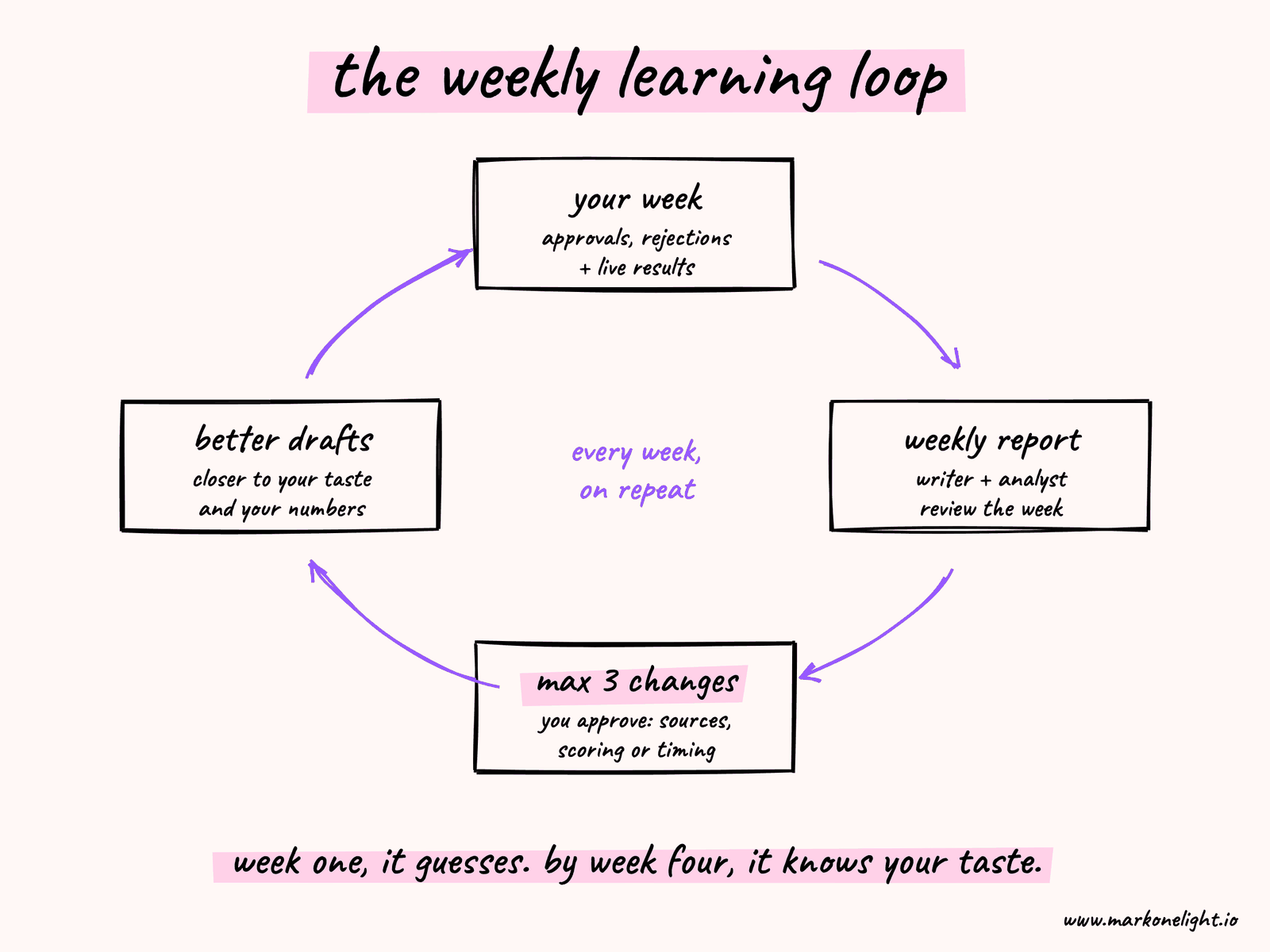
This is where the system stops being a bot fleet and starts behaving like an editorial team that knows your taste and your numbers. The first week it guesses. By week four, it has a month of your decisions and a month of live results to work from.
Pro-Tip: Mind the Cost and the Rate Limits
Be clear-eyed about what it costs. Grok Bot has no separate subscription – access comes with a paid Cursor plan: Pro at $20 a month, Pro+ at $60, or Ultra at $200, each with a bigger weekly usage allowance. You can also unlock it by linking an individual SuperGrok or X Premium+ subscription. Usage is measured by the steps and tokens your bots use, so a seven-bot team running every weekday uses far more than a single bot. When the weekly allowance runs out, extra usage is billed on demand. [1], [2]
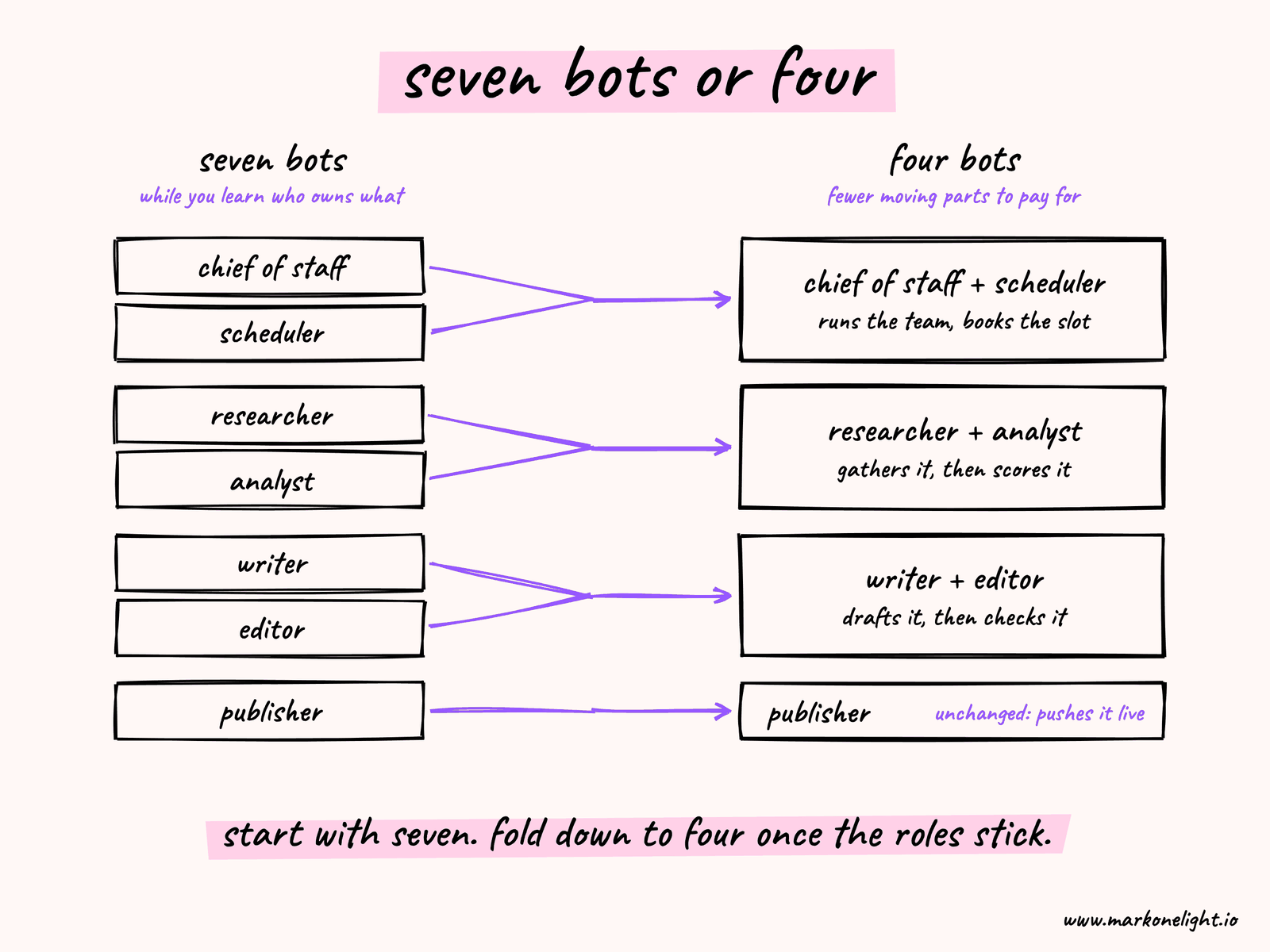
A strict seven-bot loop also has more moving parts – more handoffs to coordinate and more agents drawing tokens at once. If you feel that friction, you don't have to abandon the design – compress it. The same pipeline collapses cleanly into four bots without losing a single stage:
- Chief of Staff + Scheduler – one bot orchestrates the team and books the publish slot.
- Researcher + Analyst – one bot gathers live context (via a tool like Firecrawl) and scores it against your dashboards.
- Writer + Editor – one bot drafts and self-checks against the Unabyss context and your style guide.
- Publisher – one bot pushes the finished piece live (via a tool like Blotato).
Start with seven while you're learning who owns what, and fold down to four once the boundaries are second nature and you want fewer moving parts to pay for.
A 30-Day Rollout
Tonight: set up the Chief of Staff and the Researcher, load a 20-source watchlist, and schedule the Researcher for 6am. Tomorrow morning, compare every item it surfaces against its source. Fix any instruction that distorted or missed the signal.
Days 2–7: configure the Writer and Editor. Run the same morning signals through the Chief of Staff and all three working bots. Compare the drafts to what you would have written, and adjust the prompts until every major disagreement has a clear explanation.
Week two: add the Analyst, then run the full research-to-editor-to-analyst pipeline end to end. Take at least three signals from source to scored, approvable draft.
Week three: log the Scheduler and Publisher into X and add the weekly learning loop. Ship at least one fully automated piece – approved by you, queued by the Scheduler, published by the Publisher – and record the metric it should improve.
Day 30: check the signal-to-draft rate, draft-to-approval rate, cost per published piece, average time from signal to decision, and how often the Analyst's forecast matched the real result.
Each morning, read what the team surfaced. Keep what surprised you, correct what missed the mark, and let it run again.
Over the next month, those small corrections compound. The watchlist gets sharper. The drafts arrive closer to something you would actually publish. And the pieces don't just wait for you – they ship on the schedule the numbers recommend.
By day 30, every draft in your Grok Bot thread has passed through a system shaped by a month of your approvals, rejections, and published results.
You still make the final call – the seven-bot team just makes sure you have better options, better timing, and a finished piece already on its way out the door when you make it.
So start tonight. Create the Chief of Staff, connect Unabyss, and load 20 sources. Tomorrow morning, open the thread and read what the team surfaced – then keep what's good and tell it why.